
RPG Scribe Pathfinder & 3.5e
Rlyeh IndustryEntertainment
4.3188.00 Reviews
- Version
- 1.83
- Installs
- 10.00K
- Age Rating
- Everyone
Screenshots
Our Review of RPG Scribe Pathfinder & 3.5e
 Analysis by Appyee
I find the biggest hurdle with a character-sheet app is not entering a name and a few numbers; it is deciding how much of a campaign to move into it before game night. RPG Scribe Pathfinder & 3.5e is aimed at players who want a smart sheet for these tabletop systems, and its many character-management options make it more useful once a character has started accumulating details. My practical advice is to begin with what you regularly need at the table, then add the less-frequent information when you have time. That keeps setup from becoming its own campaign.
Getting Started with RPG Scribe
I’d use this section to focus on making the first character record manageable: gather the details you already know, then add less familiar entries as you confirm them with your group. That approach can make the first session with a digital sheet feel less like data entry and more like a useful transition from paper.
Where setup can feel demanding
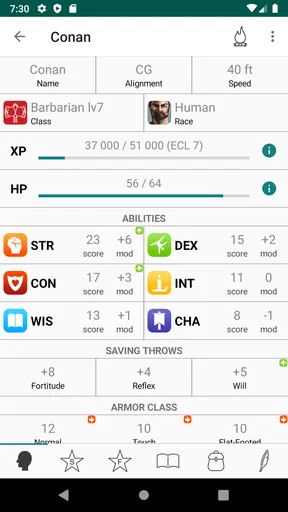
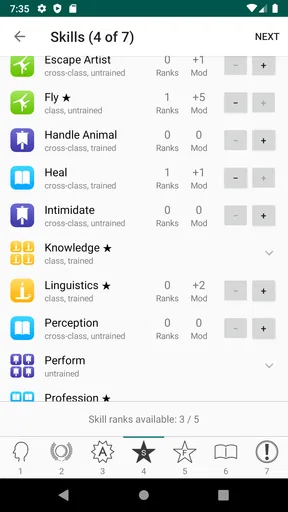
First off, downloading and setting up RPG Scribe Pathfinder & 3.5e was as smooth as butter. Available on both Android and iOS, the app is designed with a clean, user-friendly interface that even the most tech-challenged among us can navigate. Setting up a new character sheet is as simple as tapping a few buttons, and before you know it, you're diving into the nitty-gritty details of your character's backstory and abilities.
That easy start does not mean every later choice is obvious. A detailed tabletop character can involve lots of connected information, and the app’s range of controls may feel like a lot if you arrive expecting a bare-bones digital page. I would avoid trying to fill every field in one sitting. Put in the character details you know, check that the core sheet makes sense to you, and leave uncertain or campaign-specific entries until you can confirm them with your group or game master.
This is particularly useful when you are converting a character from paper. Instead of typing everything over in a hurry, keep the paper sheet nearby and compare one area at a time. It is easier to catch a missed modifier or inventory entry before a session than while everyone is waiting for their turn. The app can organize what you enter, but it cannot decide which interpretation of a rule your table uses.
Features That Stand Out
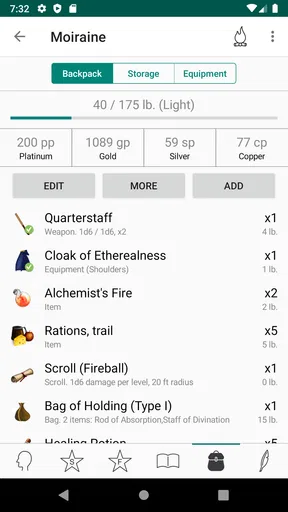
One of the standout features is the app’s comprehensive character management system. You can easily update stats, track experience points, and manage inventory with a few taps. No more flipping through pages of notes or losing track of those precious health points during intense battles. It's like having a digital Dungeon Master at your fingertips.
Speaking of battles, the combat tracking feature is a godsend. You can keep track of initiative orders, log damage dealt, and even track status effects. It really streamlines the process, letting you focus more on the strategy and less on the admin work. Whether you're a seasoned player or a newbie, this feature is a game-changer.
In practice, I would treat combat tracking as a support tool rather than a replacement for paying attention. Before a busy encounter, check that the initiative order and current effects reflect what the table agreed on. If something changes verbally, update it straight away or make a quick note to do it after the immediate decision. A tracker is most helpful when it reflects the shared state of the encounter; an outdated entry can be more distracting than a pencil mark.
A useful habit is to make a quick end-of-session pass through the character record: reconcile damage or recovery, adjust inventory, and check experience points against what the group awarded. That small routine helps prevent the familiar problem of trying to remember several sessions’ worth of changes at the next meeting. It also gives you a chance to spot an entry that needs clarification rather than quietly carrying a mistake forward.
Customizability and User Experience
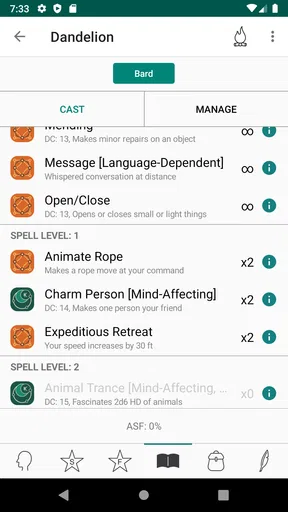
Now, let's talk about customizability. The app allows for a ton of personalization. You can tweak your character's abilities, add custom spells, and even import items. It feels like the app was designed with the players’ needs in mind. Plus, the ability to sync data across devices means you’re never tied to one screen—perfect for the on-the-go adventurer.
Those options are valuable, but they also create a trade-off: custom entries can make a sheet fit a particular campaign while requiring you to keep your own naming and notes consistent. I would use clear labels for anything unusual, especially if a character has a house-rule ability or an item whose effect differs from the familiar version. That makes it easier for you and the game master to understand the entry later, instead of assuming the app has resolved every rules question automatically.
For a realistic game-night routine, imagine arriving at a session after work with only a few minutes to get settled. You can use the character record to check the details you tend to forget, then keep the table’s discussion focused on the scene rather than searching through a notebook. After a new item or effect comes up, record it when the action pauses. The benefit is not that the app plays the character for you; it is that your notes and stats are easier to consult when attention is split between the table and the story.
Device syncing can help if you switch screens, but I would not treat syncing as a substitute for a sensible backup habit or for checking that the version you plan to use has the latest changes. Before relying on a device change at the table, open the relevant character on the device you will bring and make sure the entries you expect are there. That simple check is worthwhile for any campaign record you care about.
One small hiccup I encountered was the initial learning curve. With so many features packed into one app, it can feel a bit overwhelming at first. However, once you get the hang of it, navigating through the app becomes second nature. The developers have included a handy help section, which comes in super handy if you find yourself lost in the menu jungle.
If a screen or entry feels confusing, I would first check whether I am in the right part of the character record and whether I have saved the change as intended, rather than repeatedly entering the same information. The help section is a sensible next stop when a control is unfamiliar. For a rules disagreement, though, the better source is your table’s agreed rules or reference material: a character-sheet app can store a choice without settling the debate behind it.
Choosing the right tool for your table
Compared with a paper sheet, the app’s strongest appeal is having character details, inventory, and combat notes together in a form you can update. Paper remains the more comfortable choice for players who like freehand annotations, want to see a whole sheet at a glance, or would rather not use a device during play. A general notes app is flexible, but it asks you to build and maintain your own structure; RPG Scribe is more purpose-built for managing characters in Pathfinder and 3.5e.
It is best suited to players who enjoy keeping a detailed character record and want the convenience of updating it digitally. It may be less appealing if you only need a simple name-and-stats reference, dislike navigating menus, or prefer a physical sheet you can mark up without thinking about device access. A new player can still use it, but I would learn the table’s character-building choices first rather than expecting an app to teach the entire game system.
There is also a practical difference between a player’s record and a group’s shared source of truth. The app can help you manage your own character, while a party may still prefer a separate shared document or spoken check-ins for campaign-wide information. I would not move every group note into a personal character tool by default; keep the information where everyone who needs it can reliably find it.
When a problem may come from elsewhere
If a total or effect seems wrong, check the character inputs and the table’s interpretation before assuming the app has failed. A missing adjustment, a custom rule, or a detail entered differently from the paper version can all lead to confusion. Compare the relevant entries with the source your group uses, then correct one item at a time. This is more dependable than changing several fields at once and losing track of what fixed the discrepancy.
For a change that does not appear where expected, pause before re-entering it. Revisit the character record, confirm the entry itself, and check the version you are using. The current version is 1.80, and the app requires Android 6.0 or later. The app is listed for both Android and iOS, so it is worth checking compatibility on the specific device you intend to use rather than assuming every older phone or tablet will behave alike.
Cost, audience, and ongoing use
RPG Scribe is a paid entertainment app, priced at $2.99, with in-app purchases ranging from $1.00 to $10.00 per item. I would decide whether its character-management approach suits your routine before spending time building several elaborate sheets. Its Everyone age rating makes it broadly suitable from an age-rating standpoint, but the actual tabletop material and group expectations still depend on the campaign.
Rlyeh Industry is the developer, and the app has a 4.3 average from around 400 ratings, with over 180 written reviews and more than 10,000 installs. Those figures suggest that it has found an audience among tabletop players, but they are not a guarantee that its layout will fit every group. The app was released on May 28, 2020, so I would judge it by how it works for your current device and campaign rather than by assuming that age alone says anything about day-to-day usefulness.
Community and Updates
The community around RPG Scribe is pretty active, which is always a good sign. The developers seem to take feedback seriously, rolling out updates that address user issues and add new features. This kind of responsiveness is crucial in the rapidly evolving world of RPGs where new rules and updates are frequent.
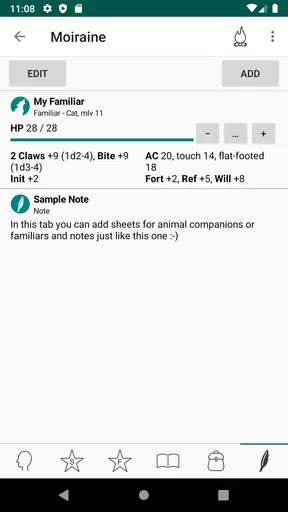
Another cool aspect is the integration with other players. You can share character sheets and campaign notes with your group, making it easier to keep everyone on the same page. It’s a nice touch that adds a collaborative element to the app.
My practical verdict
All in all, RPG Scribe Pathfinder & 3.5e is a robust tool for anyone serious about their role-playing games. It takes a bit of time to adjust to all of its features, but the payoff is well worth the effort. From character management to combat tracking, it covers all bases, making it a must-have for any RPG enthusiast.
I would recommend it most to someone who plays these systems regularly, likes a structured digital sheet, and is willing to spend a little time learning where things belong. If your sessions are occasional, your character is simple, or you strongly prefer handwriting and seeing everything at once, paper may be the easier choice. Likewise, if what you need is a complete rules reference or a campaign-wide planning space, use a tool suited to that job instead of expecting a character manager to cover it all.
If you’re ready to level up your RPG experience, give this app a shot. Whether you’re deep in the dungeons or casually exploring the fantasy worlds, having RPG Scribe by your side will ensure you're always prepared for whatever adventure comes your way.
Verdict
Strengths of RPG Scribe Pathfinder & 3.5e
- Intuitive character sheet management.
- Supports multiple character builds.
- Offline access to data.
- Customizable spell lists.
- Regular updates and bug fixes.
Limitations of RPG Scribe Pathfinder & 3.5e
- Limited free version features.
- Initial setup can be time-consuming.
- No integrated community features.
- Requires some Pathfinder knowledge.
- Occasional sync issues between devices.
Similar Picks in This Category
View All
Google Play Games
Google LLC3.9

Netflix
Netflix, Inc.4.8

YouTube Kids
Google LLC4.2

Disney+
Disney4.4

Prime Video
Amazon Mobile LLC4.7

Steam
Valve Corporation3.2
Frequently Asked Questions
What is RPG Scribe Pathfinder & 3.5e used for?
RPG Scribe Pathfinder & 3.5e is a comprehensive character management app designed for role-playing game enthusiasts. It is specifically tailored for Pathfinder and Dungeons & Dragons 3.5e editions. The app allows users to create, manage, and organize character sheets, ensuring all character details are accurately tracked during gameplay.
Does RPG Scribe Pathfinder & 3.5e support character customization?
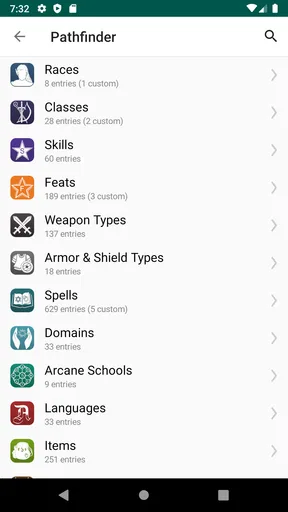
Yes, RPG Scribe Pathfinder & 3.5e offers extensive character customization options. Users can tailor their characters with various classes, abilities, skills, and equipment. The app provides a user-friendly interface that makes it easy to navigate through different customization options, ensuring a personalized gameplay experience.
Is RPG Scribe Pathfinder & 3.5e suitable for beginners?
While RPG Scribe Pathfinder & 3.5e is feature-rich and offers tools that can be appreciated by veteran players, it is also quite accessible for beginners. The app includes tutorials and help sections to guide new players through character creation and management, making it a great choice for anyone new to tabletop RPGs.
Does RPG Scribe Pathfinder & 3.5e require an internet connection?
No, RPG Scribe Pathfinder & 3.5e does not require an internet connection for most of its features. Once installed, users can access character sheets and other functionalities offline. This makes it convenient for players who enjoy gaming in areas without reliable internet access.
Are there regular updates and support for RPG Scribe Pathfinder & 3.5e?
Yes, the developers of RPG Scribe Pathfinder & 3.5e are committed to providing regular updates and support. These updates often include new features, bug fixes, and enhancements based on user feedback. The app’s support team is also responsive to inquiries, ensuring a smooth user experience.
